
1. The Problem Statement
In an era of ubiquitous high-speed internet, you’d expect sharing a 4K movie from your home lab to a friend’s tablet to be a solved problem. However, as developers, we quickly run into three fundamental "walls"—one physical, one logical, and one computational.
The Content Silo: Data at Rest
We often store our high-quality media—4K REMUXes, high-bitrate TV shows, and personal archives—on physical HDDs. While local access is instantaneous, this data is effectively "siloed." Without a sophisticated streaming layer, your media is hostage to your physical location. Moving files via USB or cloud storage isn't just inefficient; it’s a failure of modern infrastructure. We need a way to turn static storage into a dynamic, accessible API.
The ISP Wall: The Death of Port Forwarding
If you’ve tried hosting a server in Bengaluru on a residential Jio or Airtel connection, you’ve met the "Carrier-Grade NAT" (CGNAT). Most ISPs share a single public IP across hundreds of households. This means:
- No Unique Public Identity: Your router doesn't have a reachable "front door."
- The Failure of Port Forwarding: Traditional methods of opening ports (like 8096) are rendered useless because the ISP's "mailroom" (NAT) simply doesn't know which household the incoming packet belongs to.
- Security Risks: Even if you could open a port, you’re essentially inviting every bot on the internet to knock on your system's door.
The Performance Gap: The CPU Bottleneck
Streaming 4K media isn't just about moving bits; it’s about Transcoding. If your friend’s device doesn't support a specific codec (like HEVC/H.265) or their bandwidth fluctuates, the server must re-encode the video on the fly.
- Software Encoding: Doing this via the CPU (like an i5-12400F) is devastating for performance. It can spike CPU usage to 100%, causing system lag and frames to drop.
- The High-Bitrate Challenge: Remote streaming requires real-time compression to fit high-bitrate files into a limited upload pipe (e.g., 100 Mbps) without sacrificing visual fidelity.
2. The Architecture: A Stateless Vision
To solve these problems, we need an architecture that isn't just functional, but also clean and portable. As developers, we strive for Statelessness—the idea that the application environment should be disposable, while the data remains persistent and untouched.
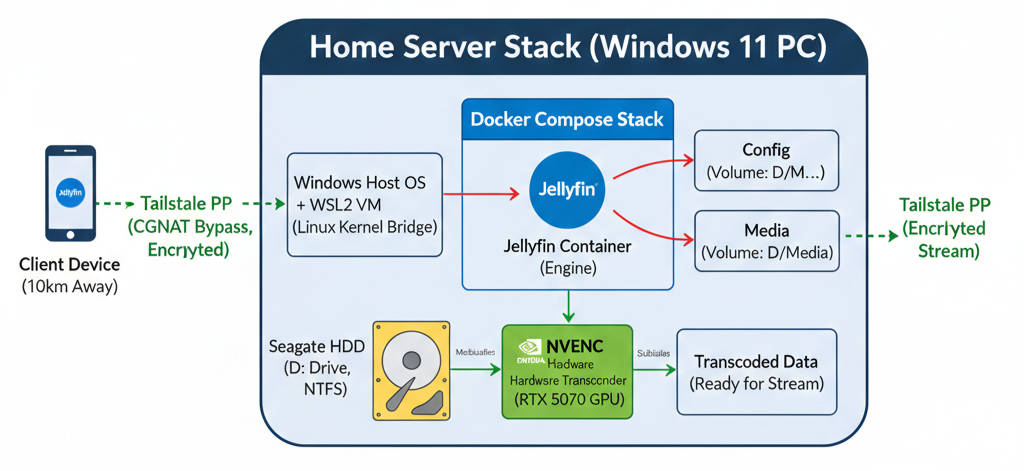
The "Stateless" Core: Decoupling Engine from Data
Most media server setups are "dirty"; they scatter configuration files and metadata across your primary OS drive. We avoided this by decoupling the Media Engine (Jellyfin) from the Media Library and Config using Docker volumes.
- The Image: The Jellyfin Docker image is our immutable "binary." It contains the logic, the transcoder, and the web UI. It can be deleted or updated in seconds without consequence.
- The Volumes: By mapping folders like
D:/Jellyfin_Server/configandD:/Mediainto the container, we ensure that every user setting, watch history, and poster is stored on the external HDD. - Portability: This makes the entire server "plug-and-play." You can plug the HDD into any machine running Docker, run
docker compose up, and the server resumes exactly where it left off.
Component Bridge: Windows, WSL2, and Containers
Running a Linux-native media server on a Windows gaming rig requires a sophisticated handoff. Docker Desktop on Windows doesn't run directly on the host; it uses WSL2 (Windows Subsystem for Linux) as a bridge.
- Windows (Host): Manages the physical hardware (RTX 5070) and the NTFS filesystem on the
D:drive. - WSL2 (Environment): Provides a lightweight Linux kernel. It uses GPU Paravirtualization (GPU-PV) to "share" the 5070's silicon with the Linux layer.
- The Container: Docker Compose orchestrates the specific environment variables and device mappings needed to ensure the Jellyfin process can "see" the GPU and "reach" the NTFS folders.
The Choice of Jellyfin: FOSS over Paywalls
In the media server landscape, the two biggest names are Plex and Emby. However, for a power user with high-end hardware, they have a significant drawback: The Paywall.
- Hardware Acceleration: Both Plex and Emby require a monthly subscription or a "Lifetime Pass" to unlock NVIDIA NVENC hardware transcoding.
- Jellyfin (The FOSS Champion): Jellyfin is a 100% Free and Open Source fork of Emby. It provides full, unrestricted access to your GPU's power right out of the box. No accounts on external servers, no subscriptions, and no tracking—just a high-performance C# backend designed for total control.
3. GPU Power: NVENC & Hardware Acceleration
While the i5-12400F is a capable CPU, using it for real-time 4K video encoding is like using a luxury sedan to haul construction materials. It works, but it’s not what it was built for. To achieve seamless streaming, we offload the heavy lifting to the RTX 5070.
The Role of the RTX 5070: Dedicated Silicon
Modern NVIDIA GPUs are more than just "graphics" cards; they contain specialized hardware circuits designed specifically for video.
- NVDEC (NVIDIA Decoder): A dedicated chip that handles the decompression of video files (like HEVC or AV1) without touching your 3D or CUDA cores.
- NVENC (NVIDIA Encoder): The counterpart that compresses the raw video frames into a streamable format (usually H.264) for the client. Because these are independent ASICs (Application-Specific Integrated Circuits), your GPU can be 100% busy rendering a game at 144 FPS while simultaneously transcoding three 4K streams with zero impact on gaming performance.
Paravirtualization: How WSL2 Shares the Silicon
In traditional virtualization, a GPU can usually only be "owned" by one OS at a time. To share the RTX 5070 between Windows and our Linux-based Docker container, we use GPU Paravirtualization (GPU-PV).
Unlike "PCI Passthrough"—which disconnects the hardware from Windows entirely—GPU-PV uses a technology called Dxgkrnl. This allows the Windows host to "slice" the GPU’s compute and video engines, exposing them to the WSL2 kernel. Inside your container, Jellyfin sees a standard NVIDIA device, but behind the scenes, Windows is dynamically scheduling tasks between your browser, your desktop, and your streaming server.
Efficiency Gains: Keeping the Host Responsive
By offloading to NVENC, the efficiency gains are massive:
- CPU Freedom: The i5-12400F stays at ~2–5% utilization, leaving all 6 cores free for development work, compilation, or gaming.
- Power Efficiency: Dedicated hardware encoders are significantly more power-efficient than general-purpose CPUs.
- Latency: Hardware-level encoding reduces the "Time to First Frame," meaning your friend hits "Play" and the video starts almost instantly, regardless of the file size.
4. Networking: The 10km Virtual Bridge
Now that the engine is running and the GPU is primed, we face the final hurdle: how do we deliver this 4K stream to a friend 10km away in Bengaluru without exposing our home network to the entire internet? The answer lies in Tailscale, a zero-config mesh VPN that makes remote devices feel like they’re on the same local Wi-Fi.
The Mesh Overlay: Private, Peer-to-Peer, and Encrypted
Traditional VPNs use a "Hub and Spoke" model, where all traffic must travel to a central server and back out. This adds massive latency—deadly for 4K streaming. Tailscale uses an Overlay Mesh Network built on the WireGuard protocol.
- Virtual Network: It assigns every device a stable, private IP (usually in the
100.x.y.zrange). - End-to-End Encryption: Your data is encrypted on your PC and decrypted only on your friend's tablet. Not even Tailscale can see your traffic.
- Direct Path: It tries to find the shortest physical path between devices, ensuring that your 100 Mbps upload pipe is used to its full potential.
The Matchmaker Pattern: A Technical Breakdown of UDP Hole Punching
The "magic" of Tailscale is its ability to bypass the ISP Wall (CGNAT) without port forwarding. It uses a technique called UDP Hole Punching:
- The Handshake: Your PC and your friend's tablet both "check-in" with Tailscale’s coordination server (the Matchmaker).
- The Intel: The server shares each device's public IP and port with the other.
- The Punch: Both devices send a UDP packet to each other simultaneously. Because your router sees an outgoing request, it opens a temporary "hole" in the firewall to let the "reply" back in.
- The Connection: Since both sides do this at the same time, the routers are tricked into allowing a direct, peer-to-peer connection. The "Matchmaker" leaves the room, and the data flows directly.
Security by Design: From Open Ports to Zero Trust
In the old world, hosting a server meant opening a port and praying that bots wouldn't brute-force your login. Tailscale shifts this to a Zero Trust model:
- No Open Ports: Your router's firewall remains 100% closed to the public internet.
- Identity-Based Access: A device can only join your "Tailnet" if the user authenticates via a trusted provider (like Google, GitHub, or Microsoft).
- Machine Keys: Every device has a unique cryptographic identity. Even if someone knows your IP, they can’t connect without being an authorized part of your private mesh.
DERP Relays: The "Plan B" for Stubborn Firewalls
In networking, things aren't always perfect. Sometimes a corporate firewall or a particularly strict ISP NAT refuses to let a "hole" be punched. For these cases, Tailscale uses DERP (Designated Encrypted Relay for Packets).
- Plan B: If P2P fails, Tailscale automatically routes the encrypted traffic through one of its global relay servers.
- Seamless: The user never notices a disconnect; Tailscale handles the failover instantly. While latency is slightly higher than P2P, it ensures that your stream stays alive no matter how "stubborn" the network environment is.
5. Implementation: Bringing it to Life
With the architecture and networking logic in place, the final step is the actual deployment. Using Docker Compose, we can turn this complex hardware-software handshake into a simple, reproducible script.
The Docker Compose Strategy: Infrastructure as Code
The heart of the setup is the docker-compose.yml file. Here is a simplified breakdown of the key configurations we used to bridge the RTX 5070 and our media library:
services:
  jellyfin:
    image: jellyfin/jellyfin:latest
    container_name: jellyfin_portable
    # REMOVED network_mode: "host"
    ports:
      - 8096:8096   # Web UI
    volumes:
      - D:/Jellyfin_Server/config:/config
      - D:/Jellyfin_Server/cache:/cache
      - D:/Jellyfin_Server/transcode:/transcode
      - D:/Media:/data
    restart: unless-stopped
    deploy:
      resources:
        reservations:
          devices:
            - driver: nvidia
              count: 1
capabilities: [gpu]- GPU Reservations: The
deployblock is crucial. It tells Docker to request the NVIDIA driver from the WSL2 kernel. - Restart Policy:
unless-stoppedensures that if your PC restarts after a Windows update, the media server spins back up automatically, but it respects your choice if you manually stop it for a heavy gaming session.
Filesystem Logic: Bridging NTFS and Linux
One of the most common points of confusion in Docker on Windows is the pathing. Windows uses drive letters (like D:/), while the Jellyfin container expects a Linux-style root (like /data).
- The Mount: By declaring
D:/Media:/data, we are performing a Bind Mount. - The Translation: Docker Desktop intercepts the container's requests for
/dataand redirects them to the physical sectors of your Seagate HDD. This allows Jellyfin to scan your library with native speed while keeping the actual files safely on your NTFS-formatted drive.
Client Configuration: The Last Mile
Connecting the remote client is the simplest part of the process, thanks to Tailscale's MagicDNS.
- Tailscale Setup: Your friend installs the Tailscale app on their Android tablet and signs in using the invitation you sent.
- The Jellyfin App: They download the Jellyfin client and, instead of a complex public IP, they simply enter your machine's Tailscale address (e.g.,
http://100.x.y.z:8096). - Authentication: They log in with the user credentials you created in the Jellyfin Dashboard. Because they are inside your "private mesh," the connection is as secure as if they were sitting in your living room.
SyncPlay: Synchronized "Watch Together" Sessions
As a final touch, we utilize SyncPlay. This Jellyfin feature allows multiple users to synchronize their playback.
- Technicality: When one person pauses or seeks, a command is sent to the server, which then broadcasts that state change to all other clients in the group.
- Performance: Because Tailscale provides a low-latency P2P path, the "drift" between you and your friend's stream is minimal, making for a perfectly synchronized viewing experience—even when you're 10km apart.
6. Conclusion
The result of this architecture is a stateless, hardware-accelerated private cloud that rivals commercial streaming platforms in performance while far exceeding them in privacy. By offloading the computational tax to the RTX 5070 and using Tailscale to dissolve the ISP's CGNAT barriers, we’ve transformed a high-end gaming rig into a robust media backbone.
Final Thoughts
As a developer, the most satisfying part of this project isn't just watching a movie; it's the portability and control. Because the environment is containerized, I can migrate this entire setup to a different machine in minutes just by moving a single YAML file and an external drive.
And obviously best part is I can now stream my media from anywhere in the world.
7. Glossary & References
Glossary
- NVENC/NVDEC: Dedicated hardware circuits on NVIDIA GPUs designed to handle video encoding and decoding independently of the main graphics or compute cores.
- CGNAT (Carrier-Grade NAT): A networking technique used by ISPs to share a single public IPv4 address among multiple customers, which prevents traditional inbound port forwarding.
- Statelessness: An architectural design where the application's state (data, config) is kept separate from the application's execution environment (container), allowing for easy updates and migration.
- UDP Hole Punching: A technique used by Tailscale to establish a direct P2P connection between two devices behind firewalls without needing to open ports.
- WSL2 (Windows Subsystem for Linux): A compatibility layer for running Linux binary executables natively on Windows 10 and 11, which provides the kernel-level bridge for Docker.
References
- Jellyfin Documentation - Official guide for server configuration and hardware acceleration.
- Tailscale: How NAT Traversal Works - A deep dive into the engineering behind UDP hole punching.
- NVIDIA Container Toolkit - Documentation for exposing NVIDIA GPUs to Docker containers.
- WireGuard Protocol - The modern, high-performance VPN protocol that powers Tailscale's encryption.